
Give guests a useful next step
Make booking details, attendance confirmation, delay updates and available booking changes easy to find.
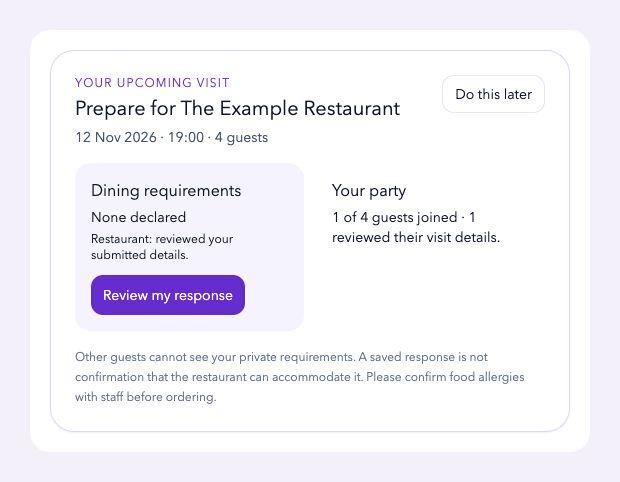
Built around the working day
Make booking details, attendance confirmation, delay updates and available booking changes easy to find.
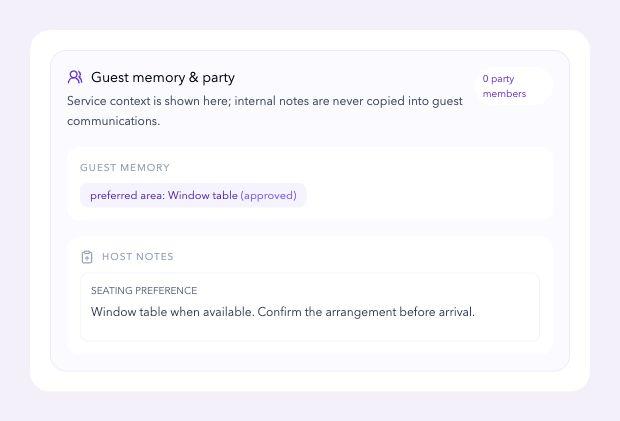
Bring previous visits, known preferences and relevant service context into the guest record.
Let authorised staff review the details that matter for the upcoming service.
How the work connects
The guest checks the reservation, confirms attendance or reports a delay. The host sees the update with useful visit context before arrival.
The guest has a clear next action and the team can prepare the welcome.
An example workflow. Explore your restaurant’s setup in a demo.Upcoming bookings, visit history, calendar export, attendance updates and booking-management links in one place.
Amendments and cancellation follow the reservation’s status and your restaurant’s configured rules.
Keep contact details, visit history, relevant notes, preferences and communication permissions together.
Advanced dietary, accessibility and party-sharing features require separate venue setup. Recording a request does not confirm that the restaurant can accommodate it.
A closer look at the workflow
Useful self-service gives the guest a next step and gives the restaurant current information. Keep requests, confirmed arrangements and previous visit context clear.
Booking details and management links give the guest somewhere to check the reservation, confirm attendance or report a delay before arrival.
Guest → booking updateAuthorised staff review the upcoming booking with relevant visit history and practical preferences. A recorded request stays distinct from an arrangement the restaurant has confirmed.
Host → prepared service briefingKeep relevant service notes and communication preferences in the guest record. Review what remains useful so the next welcome has context the team can act on.
Restaurant → useful guest historyConnected Findsy workflows
Getting started
Start with the workflow you need. Review your current records, configure the restaurant and rehearse with the team before launch.
Your practical questions
Bring any venue-specific requirement to the demo so the team can confirm the available workflow and setup.
Guests can review bookings and visit history, use calendar export and access permitted attendance, delay and booking-management actions.
No. The restaurant still needs to review the request and confirm the arrangement where appropriate. Optional dietary and accessibility features require separate venue setup.
Access follows the configured staff roles and venue scope. Review who needs the information and how notes will be maintained during setup.
A booking and a marketing preference are separate. Communication permissions and exclusions need to be recorded and reviewed for the intended use.
Your 15-minute Findsy demo
Bring one current challenge. Walk through the relevant guest and team views, then discuss your starting point.
Book a 15-minute demo →Open a guest’s booking and permitted next actions.
Review the useful information available to the host.
Discuss your guest-note standard and access needs.